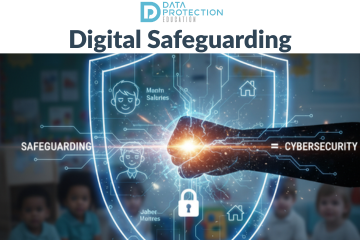
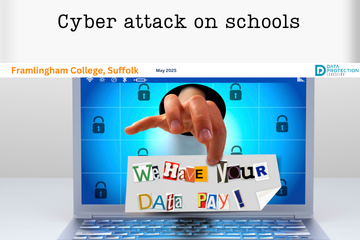
A cyber attack on nursery chain, Kido claims to have stolen photos, names and addresses of around 8,000 children. The information includes parental details and carers and safeguarding notes.
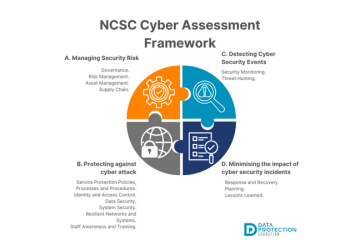
The Cyber Assessment Framework (CAF) is cyber security guidance for organisations that play a vital role in the day-today life in the UK and organisations should look to it as guidelines for helping keep data safe.
Joe Tidy, BBC's Cyber correspondent has published a blog about cyber crime in schools following the ICO issuing a warning about the 'worrying trend' of students hacking their own school and college IT systems for fun or as part of dares. We explore the situation and what you should do when it happens.
The Murky Panda (also known as Silk Typhoon) is a cyber threat that has had significant activity since 2023 and has targeted government, technology, academic, legal and professional services. Currently there are reports of the threats only in North America, however, as the Murky Panda has previously targeted compromises in the cloud, it is assumed that they will easily transition to attacks further afield. The threat group is a China-nexus group motivated by intelligence collection.
Fraud is deception used to gain something valuable (money, goods, services or information) from someone else's dishonesty. We are seeing a lot of blended cyber attacks in the news currently where social engineering might then be combined with an impersonation followed by a ransomware attack, in order to take data and/or money.
🛡️🕷️ The Scattered Spider is a fast-growing group of cyber attackers currently on the attack and possibly attributed to the recent attack on M & S - they don't just break in and grab one thing, they like to cause as much chaos as possible and then ask for a ransom.
📢 This week the news has reported cyber attacks on several major UK retailers: Marks and Spencer, the Co-op and Harrods, all of which have given everyone a stark reminder of the ever-present and evolving threat of cyber crime.
☁️📲Apple has taken unprecedented steps to remove its highest level data security tool from customers in the UK - the reason? The UK government demanded access to user data.
📢 It's important to be prepared for when a cyber incident happens to you. Part of that preparation should include having a Cyber Incident Response Plan, and part of that plan should include how to communicate, who does the communication and what they should say.
We are sharing some of blog posts by school ICT technicians and ICT managers that are giving their advice about keeping your school cyber secure and resilient.
The recent news has been full of the global IT outage that affected many systems over the weekend, including airlines and patient access. Although the incident was not caused by a cyber attack, it is important to note that it was a cyber incident which affects everyone.
A cyber incident is an event with threatens the confidentiality, integrity or availability of information systems, networks or the information they contain.
Cyber incidents can be intentional or accidental and can cause major disruptions. The recently reported CrowdStrike incident caused significant global disruption. While there are huge impacts to the affected systems, for which there are now fixes available, there will be an aftermath of 'unrest' where threat actors will use people's vulnerability and concern to send phishing emails.
The NCSC has already reported an increased in phishing activity as opportunistic and malicious actors seek to take advantage of the situation. The emails could be aimed at organisations or individuals.
Article images created using Microsoft Copilot AI. Micro Learning video created using Vyond AI.
What to do in the event of a cyber attack
First, follow your cyber response plan. Record the incident in your internal incident log, inform your governing board or trustees, and contact your Data Protection Officer (DPO) as soon as possible if personal data could be involved.
Incidents or attacks where a security breach may have taken place, or other damage was caused, should also be reported to an external body. The SLT digital lead is responsible for assigning someone to report any suspicious cyber incidents or attacks. This person will need to report to:
Report Fraud, which replaced Action Fraud in December 2025, on 0300 123 2040 or through the Report Fraud website. Make sure it is recorded as a crime report so that you receive a crime reference number.
the DfE sector cyber team at This email address is being protected from spambots. You need JavaScript enabled to view it.
the Information Commissioner's Office (ICO) within 72 hours of becoming aware of a personal data breach, unless the breach is unlikely to result in a risk to people's rights and freedoms. If the risk is high, you must also tell the people affected without undue delay. Your DPO can help you assess this. We will do this on behalf of DPE customers.
the Risk Protection Arrangement (RPA) emergency assistance helpline on 0800 368 6378 or This email address is being protected from spambots. You need JavaScript enabled to view it., if you are an RPA member, or your cyber insurance provider if you have one
Police investigations may find out whether any compromised data has been published or sold, and identify the perpetrator. Preserving evidence is as important as recovering from the crime. Keep a clear record of what happened, when, and what actions you took. The DfE's guidance on record keeping in an incident explains what to capture.
Reporting suspicious emails and texts
Forward suspicious emails to This email address is being protected from spambots. You need JavaScript enabled to view it.. Report scam text messages by forwarding the original message to 7726 (it spells SPAM on the keypad).